Headroom: Knowing How Much AI You Have Left
There's a particular kind of annoyance that comes from hitting a rate limit mid-task. Not at the start, when you could have planned around it. Halfway through a refactor, with the shape of the thing in your head and nowhere to put it.
I use Claude Code most days and ChatGPT Codex alongside it. Both have subscription limits. Neither tells you where you stand unless you go looking — /status in one, a dashboard in the other. By the time you think to check, you've usually already found out.
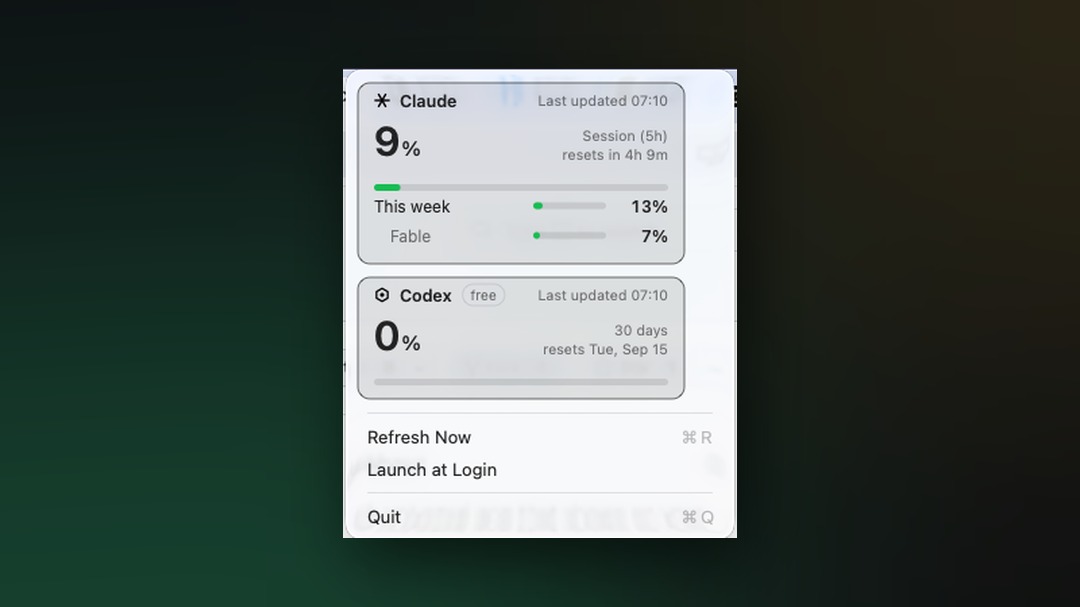
So I built Headroom: a menu bar app that shows both, always, without being asked.
One number that matters
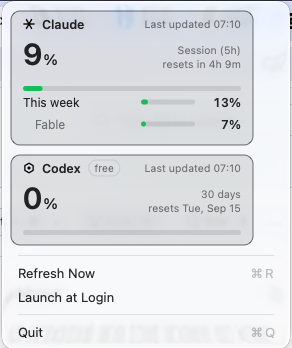
The design question turned out to be narrower than I expected. Each provider reports several limits — Claude has a five-hour session window, a weekly window, and per-model scopes; Codex has a primary window whose length depends on your plan. Showing all of them at a glance is noise.
Only one of them can actually stop you: whichever runs out soonest. That's the big number on each card. Everything else sits beneath it, available when you want it.
The menu bar shows a mark and a percentage per provider. Green below 75%, amber from 75%, red from 90%. You're not meant to read it — you're meant to notice when it changes colour.
The bug that started it
The app existed before this in a simpler form, tracking Claude only. Then one day it stopped working and showed "couldn't connect with Anthropic."
It hadn't lost connection. I checked — the endpoint returned HTTP 200 on both IPv4 and IPv6, the token was valid, and the process was alive and holding a TLS connection. Everything was fine except the app's opinion of it.
The Keychain item had been rewritten at 15:38, eight hours before the token's new expiry. Claude Code had rotated its OAuth token while the app was running. A poll landed in that window, sent the superseded token, and got a 401.
The app treated a single 401 as a confirmed sign-out. It cleared the cached value, blanked the display, and doubled its retry interval — pushing the retry that would have read the new token out by up to five minutes. Once the cached value was gone, the next unrelated hiccup surfaced as "can't reach Anthropic," which was a lie. It had reached Anthropic perfectly.
The fix: auth failures now require confirmation. One failure holds the last good reading and keeps the normal poll interval, because the next poll is the one that reads the rotated token. Only a second consecutive failure treats it as a real sign-out.
That bug set the tone for everything after it. The failure mode of a tool like this isn't crashing — it's confidently telling you something untrue.
Saying what actually went wrong
Every stale reading in the old version said "Offline." I only noticed how wrong that was when I saw it on my own screen while the app held a live connection and was being rate limited. The number was right. The explanation was fiction.
Now a stale reading names its cause: Rate limited, Offline, Server error, Unexpected response. It's a small change that took a surprising amount of restructuring, because the state machine had never carried a reason — it only knew that something had failed.
The same class of bug kept reappearing. At one point the Codex card could render "Can't reach Anthropic," because that string was hardcoded rather than derived from which provider had failed. For someone signed into Codex but not Claude, that would have been the dropdown's entire content — naming a company they don't use.
Two providers, one app
Adding Codex was mostly a question of finding the data. Codex normally exposes rate limits as HTTP response headers on ordinary API calls — useless here, because reading them means spending quota to check your quota.
Reading the Codex CLI's source turned up a dedicated endpoint that returns the same information on a plain GET. That's the only reason this feature exists.
The architectural decision that mattered: each provider gets its own refresh policy. Separate backoff, separate staleness, separate in-flight guard. Codex being rate limited cannot disturb the Claude reading, and vice versa.
That sounds obvious stated plainly. It wasn't obvious in code — sharing one policy would have meant Codex displaying Claude's number in one specific failure path, which is exactly the kind of wrong-but-plausible output this app exists to avoid.
Read, never written
Headroom reads tokens that Claude Code and Codex already store on your machine — the macOS Keychain, or a credentials file on Linux and Windows.
There is no code path in it that writes, refreshes or deletes either credential. Not as a matter of policy but as a matter of construction: each CLI owns and rotates its own token, and a second process trying to help would break the login.
The Codex response also carries an email address, a user ID and an account ID. None of it is decoded. Those fields simply don't exist on the type the response is parsed into — a stronger guarantee than filtering them out afterwards, because there's nothing to forget to filter.
Three platforms, honestly
It builds for macOS, Linux and Windows, and CI runs the full test suite on all three.
But the Linux and Windows tray backends have never actually been run — by me or anyone. CI runners have no desktop shell, so they prove the code compiles, links, and passes the shared logic tests. Nothing more.
That's survivable because of where the logic lives. Everything that decides what number to show — parsing the response, computing percentages, deciding what's stale or critical, reading the token — sits in a core module that all three platforms share and that is fully tested. The tray backends only display what the core already computed.
A backend bug can draw wrong pixels or crash the tray. It cannot show a wrong number or touch a credential. That boundary was drawn deliberately, before the unrunnable code was written.
Windows needed its own solution to a problem the others don't have: the notification area has no text field beside an icon. There's no equivalent of a menu bar title. So the percentage is drawn into the icon bitmap with GDI, and the icon is swapped on each update — which is what every battery-percentage tray app on Windows does.
What I'd tell someone building something similar
Decide what your failure modes look like before you write the happy path. Almost every real bug in this project was a case of the app being confidently wrong rather than obviously broken. Those don't announce themselves.
Put the logic somewhere you can test, and let the platform layer be dumb. The parts I couldn't run are the parts that only draw. That wasn't luck; it's the only reason shipping code for two platforms I can't test is defensible.
A number without a label is a guess. Half the bugs worth fixing here were about a real value appearing under the wrong name — a weekly figure where a session figure belonged, one provider's reading under another's heading, a timestamp with nothing saying what it was the time of.
Headroom is open source and there's a landing page with install instructions for all three platforms. It does one thing: it tells you how much room you have left, and it tries very hard not to lie about it.
- Source: github.com/sunnixx/headroom
- Site: sunnixx.github.io/headroom
Comments
No comments yet. Be the first to share your thoughts.